
Instead of manually chasing every fleet maintenance reminder, use a fleet maintenance alert to service booking workflow that assigns an owner, checks the vehicle’s needs, and tracks the request through shop confirmation. This 2026 guide shows you how to build that process without treating an alert as a diagnosis or an appointment request as a confirmed booking.
- A fleet maintenance alert to service booking workflow needs vehicle identification, approval, and shop confirmation.
- Elite Auto Repair & Service Inc provides diagnostics and maintenance in Kissimmee, FL; confirm your vehicle’s service needs directly.
- Use manufacturer maintenance requirements, current mileage, and service history to check preventive maintenance reminders.
- Keep service requests open until the shop confirms the appointment and your fleet assigns vehicle handoff.
Why this matters
A maintenance alert tells you something needs attention. It does not establish which work is required, whether the vehicle is safe to drive, or whether a shop has accepted your request. Those decisions need separate checks.
For local service, Elite Auto Repair & Service Inc offers diagnostics, brakes, oil changes, AC repair, engine and transmission repair, suspension work, and tune-ups in Kissimmee, FL. Elite Auto Repair & Service Inc is a fit for Kissimmee drivers seeking those auto repair and maintenance services. Confirm vehicle suitability and scheduling directly; this workflow does not assume a fleet portal or software connection.
Your goal is a clear handoff: an alert becomes an assigned task, the task becomes an approved request, and the request becomes a confirmed appointment. Keep those stages separate in your 2026 fleet records.
Before you start
- Access and ownership: Have access to your maintenance reminders, vehicle records, and the person authorized to approve service. Assign someone to follow each request through confirmation.
- Vehicle details: Gather the vehicle identifier, make, model, year, current mileage, maintenance history, driver contact, and the exact alert text. Use the manufacturer’s maintenance information for the specific vehicle.
- The gotcha: A service reminder is not proof that work is overdue. Check whether the service was already completed but the reminder or fleet record was never updated. Dashboard warnings and reported symptoms also need separate attention; do not route every warning into routine maintenance.
The field names below are labels for a worksheet you create, not claims about any particular application’s interface. Use a shared spreadsheet, task list, or existing fleet system that your authorized staff can access.
Alert intake
Create the vehicle service record
- Create 1 service record per vehicle and service event. Add fields named Vehicle ID, Alert source, Alert received, Current mileage, Reported symptoms, Assigned owner, and Status.
- Copy the original message into Alert text. Record whether it came from a dashboard reminder, fleet system, driver report, or scheduled maintenance review. Preserve the wording rather than replacing it with a guessed repair.
- Match Vehicle ID to your fleet register. Confirm the registration or VIN when similar vehicles or reused unit numbers create ambiguity. Do not rely on the driver’s name alone.
- Enter the mileage reading and the date it was taken. Keep miles and kilometers explicitly identified; a reading without its unit is not a reliable scheduling input.
- Assign a named person in Assigned owner. Set Status to Needs review until that person checks the alert and service history.
Expected result: You have an identifiable vehicle, the original alert, a dated mileage reading, and someone responsible for the next action.
A useful intake record describes the symptom without deciding the cause. Write that the driver reports vibration during braking, for example, rather than declaring that the vehicle needs rotors. The inspection determines the repair.
Maintenance review
Check urgency and service history
- Read the vehicle’s instructions for the specific warning. If the driver reports loss of braking, overheating, smoke, or another unsafe condition, stop the routine booking process and arrange appropriate assistance. Do not ask the driver to continue a route to complete your worksheet.
- Check Last completed service against repair records. Match the actual work performed, not just the date of the last shop visit. An oil change does not establish that every other scheduled item was completed.
- Compare the reminder with the manufacturer’s time, mileage, and operating-condition requirements. Do not assign one universal oil-change interval to a mixed fleet. Different vehicles and usage conditions require different schedules.
- Add Requested work and Approval owner. Separate planned maintenance from diagnostic work when the cause of a symptom remains unknown. Ask the shop to assess the concern rather than presenting an unverified parts list.
- Record the approval decision before submitting work that requires internal authorization. Add the approver’s name and decision date so the driver does not become the accidental decision-maker at handoff.
Expected result: The record explains why service is being requested, whether it is routine or diagnostic, and who can authorize the work.
For warning-light cases, use the check engine light repair guide for fleet owners alongside this process. A fault code identifies a diagnostic starting point, not automatic permission to replace a component.
Booking request
Prepare the shop handoff
- Create a Service request containing the vehicle details, current mileage, original alert, reported symptoms, relevant service history, and requested inspection or maintenance. Include the approval contact and driver handoff contact.
- Provide 2 preferred dates when your dispatch plan allows. Label them as preferences, not booked appointments. State the vehicle’s operating commitments so the shop understands the scheduling constraint.
- Ask the shop to confirm whether it can assess the vehicle and requested work. Establish the planned drop-off arrangement and who will receive questions about findings or additional work.
- Set Status to Requested after sending the request through the shop’s current contact process. Do not mark it Confirmed simply because a message was sent or a form was submitted.
- Record the shop’s response in Confirmation details. Include the agreed appointment date, drop-off instructions, scope of the initial visit, and authorization contact. Change Status to Confirmed only after that agreement.
Expected result: The fleet and shop share a documented appointment plan rather than separate assumptions about the same vehicle.
When contacting Elite Auto Repair & Service Inc about fleet maintenance, describe the vehicle and concern first. The shop’s stated services do not establish a dedicated fleet integration, account agreement, or guaranteed completion window.
For your 2026 workflow, keep appointment timing separate from return-to-service planning. A confirmed drop-off is not a promised repair completion time. Diagnostics and inspection findings determine what happens next.
Service completion
Close the loop after the visit
- Assign Vehicle handoff to a specific person. Make sure the driver knows the appointment details and the shop knows whom to contact for approvals. Update dispatch separately so a booked vehicle is not assigned conflicting work.
- Keep Requested work separate from Completed work. Record the shop’s findings and the authorized work actually performed. If an item was deferred, leave it visible with an owner and next action.
- Save the invoice or service record with the completion date and mileage. Use those records to update your maintenance history; do not treat the original appointment date as proof of completed service.
- Update the next reminder using the vehicle’s requirements and the work completed. Resetting a dashboard reminder alone does not update your fleet maintenance record.
- Close the task only after the records, outstanding concerns, and vehicle handoff are accounted for. If the driver reports the original symptom again, create a follow-up linked to the completed visit.
Expected result: The next alert starts from documented service history rather than an unanswered request or an old reminder.
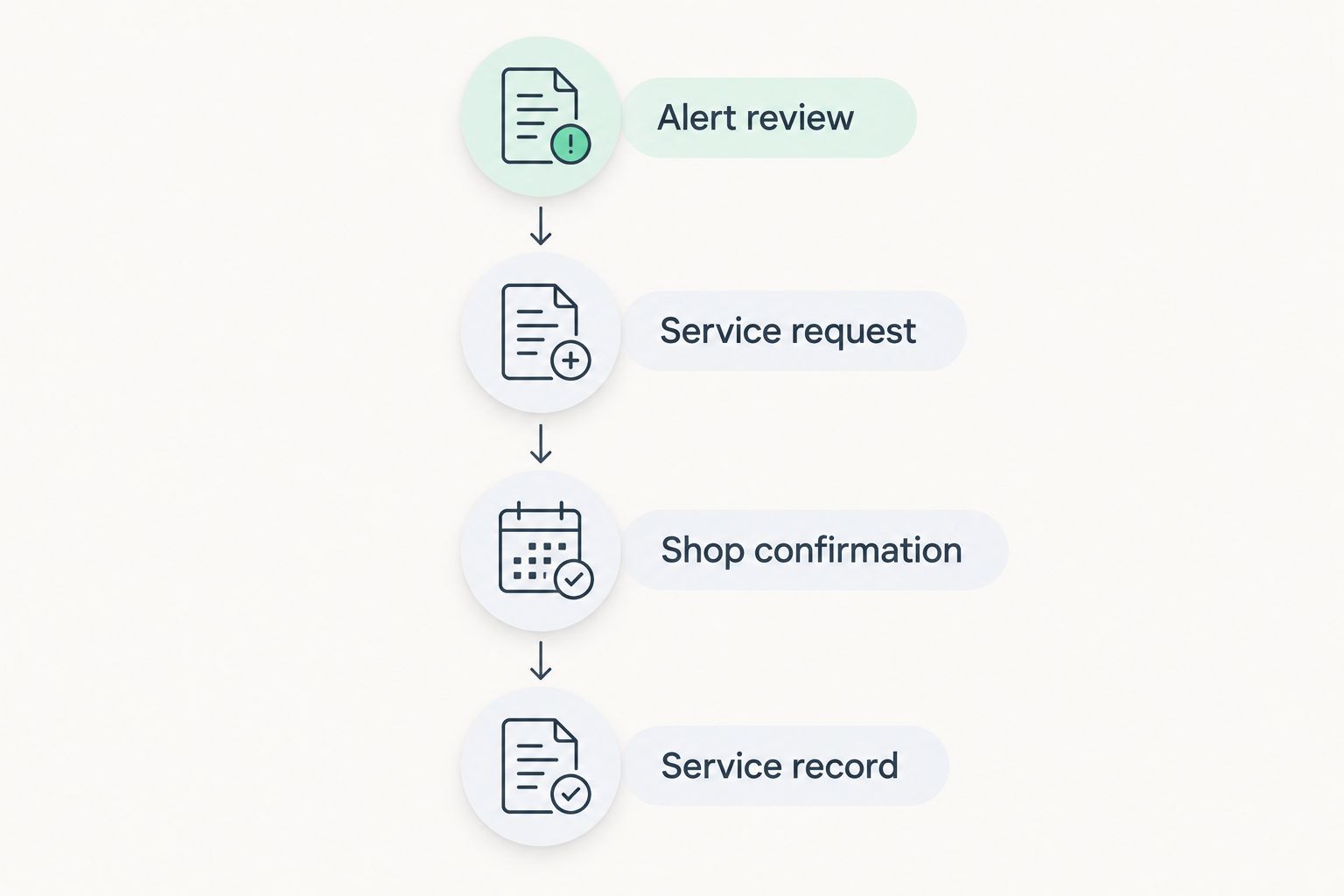
The sequence is Alert review, Service request, Shop confirmation, and Service record. Each stage needs evidence before the next person takes over.
Variant: update the request when mileage or symptoms change
A fleet maintenance request can change before the appointment. A newer mileage reading, a completed service record, or a new driver symptom should trigger review of the existing task—not another unconnected booking request.
- Match the update to the open Vehicle ID and service event.
- Compare the new information with the original Requested work and urgency assessment.
- Tell the shop about changes that affect the visit. Obtain confirmation again if the appointment scope or arrangements change.
- Record who made the update and when. Preserve the original alert so the history remains understandable.
Best for scheduled maintenance: Use a reminder-led review when the vehicle has no reported symptoms. Best for a new operating concern: Use a driver-report review that checks safety and requests diagnosis before choosing a repair.
| Workflow option | Best for | Advantage | Limitation |
|---|---|---|---|
| Reminder-led review | Planned maintenance based on vehicle requirements | Gives dispatch a defined service-planning task | Depends on accurate mileage and completed-service records |
| Driver-report review | New warning lights, noises, or operating symptoms | Captures concerns between scheduled services | Symptoms do not establish the cause or required repair |
Both routes need ownership and shop confirmation. For a 2026 fleet process, automation should create or update a review task, not imply that the shop has accepted work.
Troubleshooting
The same vehicle generates duplicate requests
Check for an existing open service event before creating another task. Use the vehicle identifier and requested work together; one vehicle can legitimately have separate concerns. Add repeat reminders to the matching record without hiding a newly reported symptom.
The alert returns after service
Compare the alert with the completed-work record. The reminder might not have been updated, or the service performed might differ from the item that triggered it. If the warning or symptom continues, ask the shop for guidance rather than repeatedly clearing it.
The driver believes the appointment is booked
Look for the shop’s confirmation, not your sent message. Keep Requested and Confirmed distinct, then give the driver the agreed details. If the request remains unanswered, follow up through the shop’s current contact process.
The shop cannot act on the request
Check whether the request identifies the vehicle, concern, mileage, and approval contact. Replace vague instructions such as general service with the known maintenance requirement or reported symptom. Do not fill missing information with a guessed diagnosis.
The service history does not match the reminder
Compare dates, mileage units, and the actual work recorded. Correct the fleet record from supporting documents before changing the next due point. Keep unresolved history gaps visible instead of marking the vehicle current without evidence.
Customize your workflow
Start with an owner-managed review before adding automated task creation. The benefit is clear accountability; the drawback is the need for staff to keep records current. Automation can route alerts, but it does not replace safety assessment, repair authorization, or shop confirmation.
For your 2026 maintenance review, check which requests remain unconfirmed, which completed visits lack records, and which deferred items have no owner. These are actionable gaps without assuming a particular software platform or inventing performance targets.
Ask Elite Auto Repair & Service Inc about the specific maintenance or diagnostic work your vehicle needs. Keep internal approval rules in your fleet record and communicate them before the visit.
FAQ
What is a fleet maintenance alert to service booking workflow?
It is a process that turns a maintenance reminder or driver concern into a reviewed, authorized, and shop-confirmed appointment. It also records completed work so the next reminder uses the correct service history.
Can a fleet alert automatically book a repair appointment?
An alert alone does not establish a confirmed appointment. Any automated booking arrangement needs an agreed shop connection and explicit confirmation; otherwise, use automation to create a review task or service request.
What information should I send with a fleet service request?
Send the vehicle identifier, make, model, year, current mileage, original alert, reported symptoms, relevant service history, and approval contact. Include preferred dates and distinguish maintenance requests from concerns that require diagnosis.
Should every vehicle follow the same maintenance interval?
No. Use the manufacturer’s requirements for each vehicle and its operating conditions. Check both elapsed time and mileage where the maintenance schedule requires them.
What should I do if a warning appears before the scheduled visit?
Review the warning and the vehicle’s instructions immediately rather than waiting automatically for the appointment. Stop driving when the condition is unsafe, arrange appropriate assistance, and inform the shop about the change.
Does Elite Auto Repair & Service Inc offer fleet software integration?
A fleet software integration is not established here. Contact the Kissimmee shop directly about your vehicle’s maintenance or diagnostic needs and confirm the appointment process.
When should I close a fleet maintenance task?
Close the task after you record completed work, completion mileage, supporting service documents, and any remaining concerns. A submitted request or confirmed appointment is not evidence that maintenance was performed.
One last thing
Do not clear an alert just to clear your task list. Preserve the original message until you can connect it to a service decision and documented outcome. That small recordkeeping rule prevents a tidy dashboard from disguising unfinished work.